Collection quality
The analytics implementation is reviewed before anyone treats the resulting data as trustworthy.
Auditedbefore the first table is built
Existing Practical Vision client? You do not need the Data Audit. Request BQSync access.
The export lands
The export is read, not changed
Your transformations run
Anything that fails, we handle
The problem
The GA4 BigQuery export is a powerful foundation, not finished analytics data teams can use.
Turning it into something BI, product, and marketing can work with takes more than moving events across.
01
The event-level detail is valuable. Repeatedly parsing nested fields and rebuilding the same logic across dashboards, notebooks and models gets between your analysts and their questions.
02
Infrastructure can work perfectly while the underlying tracking is incomplete or inconsistent. Export success is not the same as collection quality.
03
Google updates schemas and behavior. Your organization adds events, parameters and tracking requirements. Someone still maintains the work between collection and analysis.
The SQL
Querying the raw export
select
  (select value.string_value from unnest(event_params)
     where key = 'page_location')   as page_location,
  (select value.int_value    from unnest(event_params)
     where key = 'ga_session_id')   as session_id,
  (select value.double_value from unnest(event_params)
     where key = 'value')           as revenue,
  user_pseudo_id,
  timestamp_micros(event_timestamp) as event_time
from `analytics_318492371.events_*`
where _table_suffix between '20260801' and '20260820'
  and event_name = 'purchase'
Twelve lines, half of them unnesting. Every dashboard, notebook and model writes its own copy, and each copy drifts.
Querying your managed tables
select page_location, session_id, revenue,
       user_pseudo_id, event_time
from `metacortex.pv_analytics.purchase_events`
where event_date between '2026-08-01' and '2026-08-20'The unnesting moved into maintained relational tables, written once and kept working.
What BQSync does
Raw where it matters. Relational where it helps.
Human expertise around the process, so the managed pipeline keeps working when the inputs move.
The analytics implementation is reviewed before anyone treats the resulting data as trustworthy.
Nested analytics data becomes structured tables designed for plain SQL, BI tools and downstream models.
The processing is monitored and maintained as an ongoing service, not handed over as a project dump.
When upstream structures change, including changes Google introduces, the processing is adapted rather than broken.
The same event-level information stays available to product, marketing and BI.
How it works
We review how you collect, design the tables around what you actually have and what your teams need to answer, then keep the workflow operating over time.
All of it inside your warehouse.
Collected by you
GA4 property
Your existing measurement setup, exporting to BigQuery daily, streaming, or both.
Managed by Practical Vision
Audit and design
Your collection is reviewed, and the table design follows from what it actually contains.
Transformations
Nested events flattened into the tables designed for you.
When an update fails we retry it, and if it stays failed one of us picks it up. You are told what happened, in words.
Owned by you
Your BigQuery environment
Raw events stay where they landed. The relational tables sit beside them.
Read by BI, product and marketing, with your own CRM and revenue data alongside.
01
Review the implementation, what is actually being collected, and what would undermine confidence in it.
02
Work out which tables and columns you should have, from your collection and the questions your teams need to answer.
03
Create those tables inside your own BigQuery environment.
04
Refresh them on a schedule set for you, from daily to every 30 minutes.
05
Watch the workflow, and show your team the state of it in the dashboard.
06
Adapt the design and the processing as relevant upstream structures change.
What you see
We operate the infrastructure.
Your team still sees what is happening, in plain words rather than pipeline jargon.
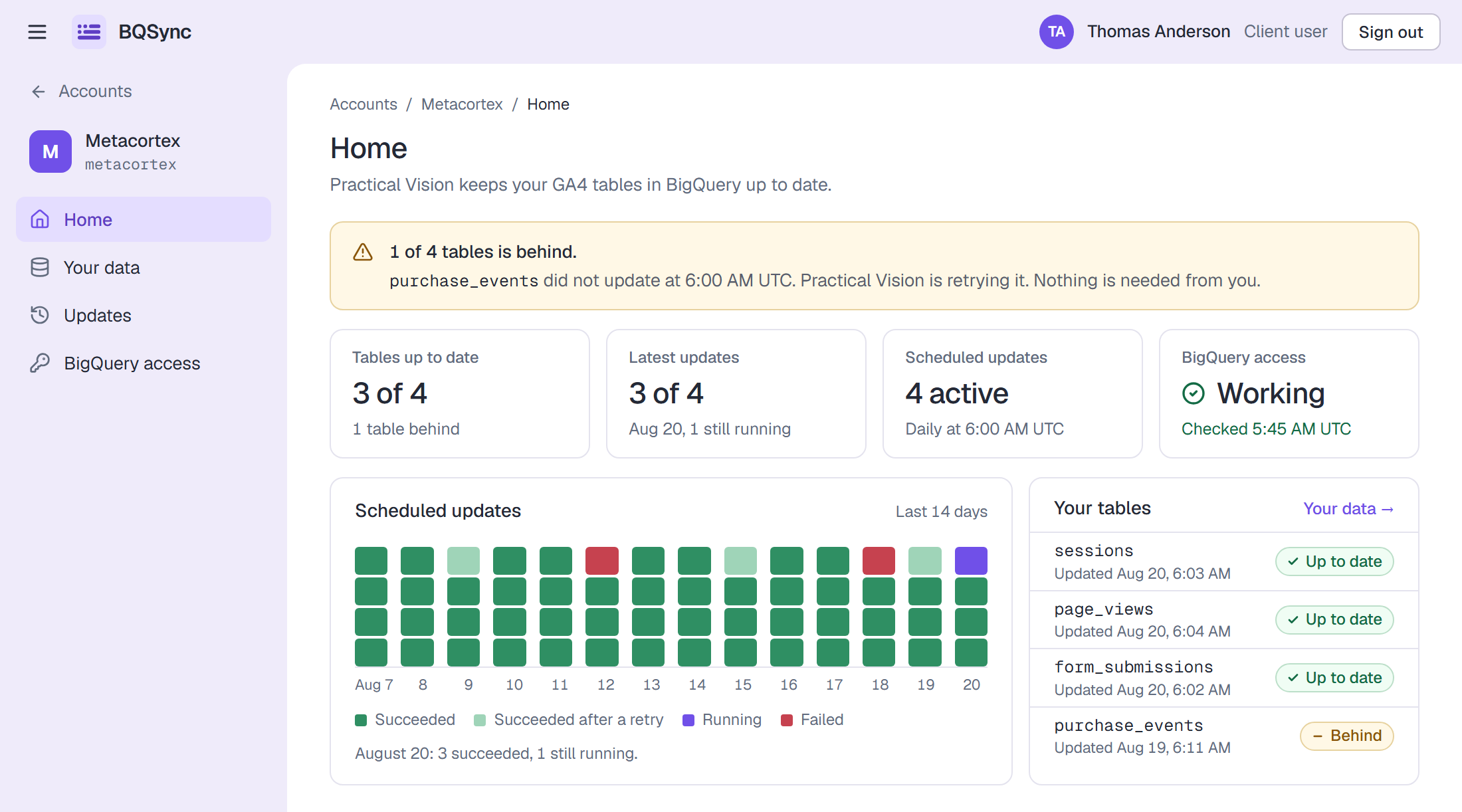
1 of 4 tables is behind.
The home screen names the tables that did not update on schedule, and says whether anything is needed from you. Usually nothing is.
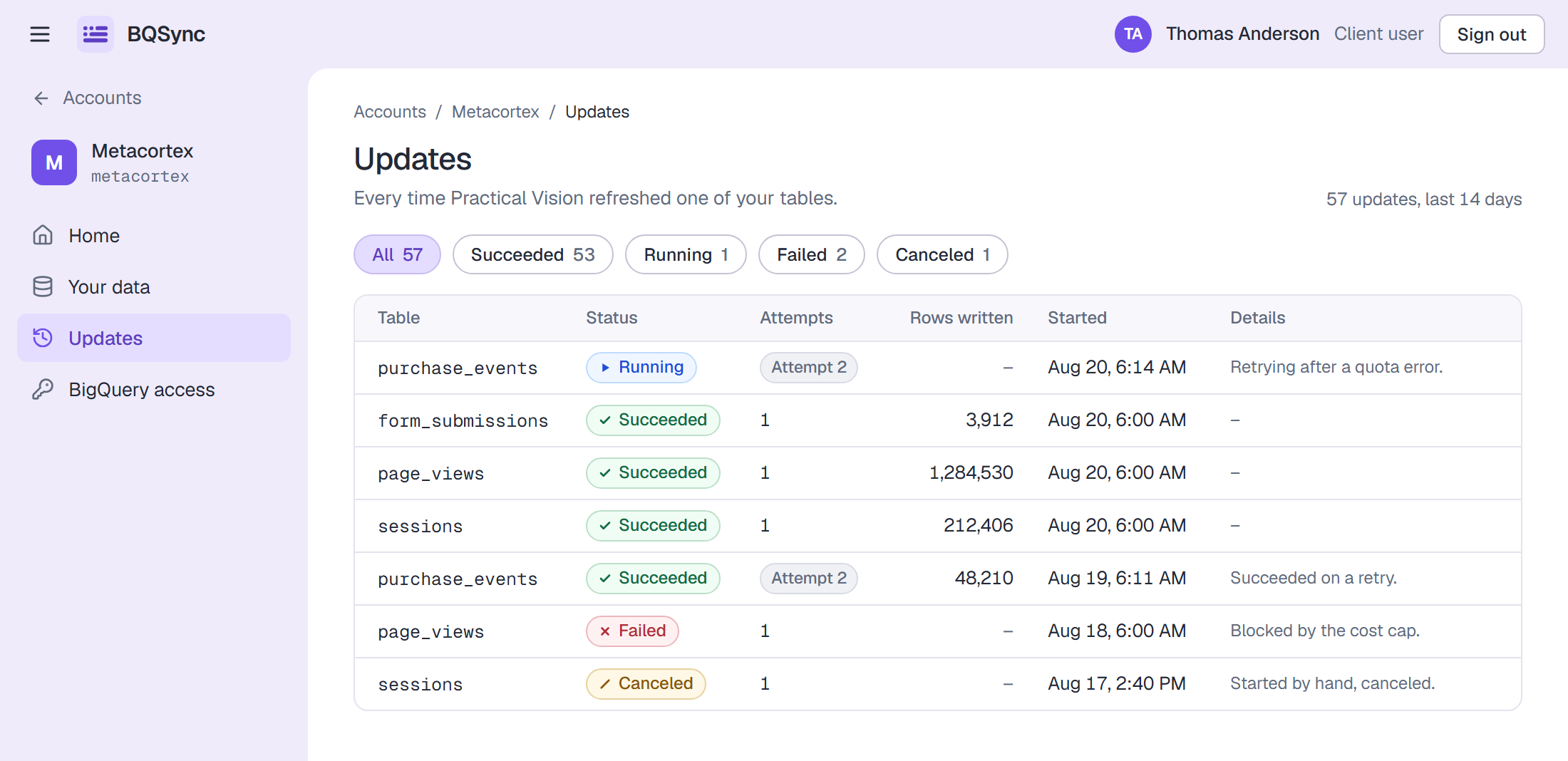
Every update, with its reason.
Each refresh is listed with its table, attempts, rows written and what went wrong if it failed.
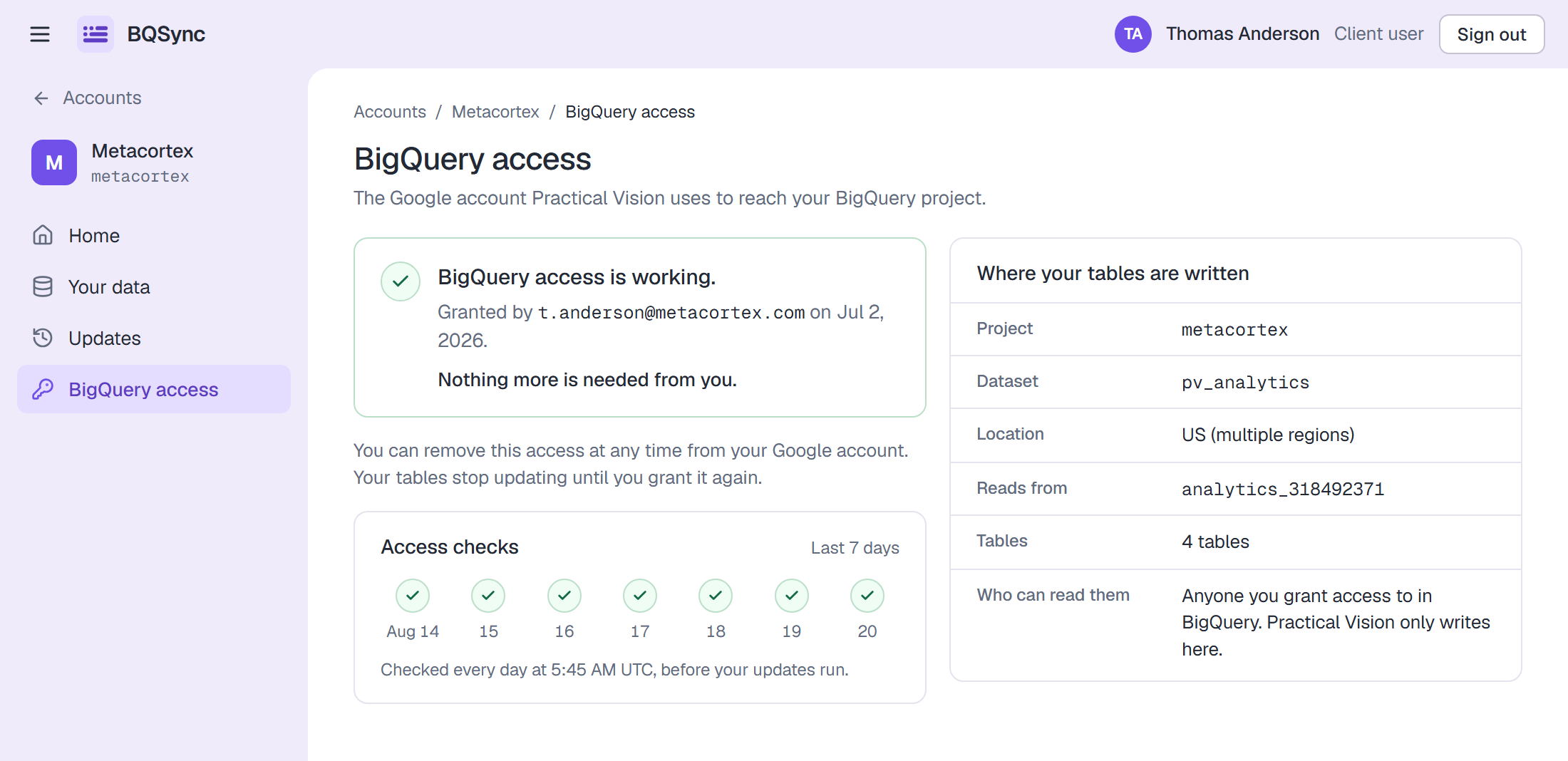
BigQuery access
WorkingThe connection to your project is checked on a schedule, so a revoked grant surfaces here before it surfaces in someone's query.
Status is written as words, never as color alone, and a stage and its health are shown separately. Approved and needs reconnect can both be true at once.
Ownership
We build the managed analytics data inside your environment. If you decide to continue without us, the tables and the queries behind them stay exactly where they are. What you would stop paying for is the operation around them: monitoring, maintenance and expertise.
Your analytics data is processed inside your own BigQuery project. It does not move to ours.
The relational tables we create stay in your project, including if you later operate them yourself.
The queries behind the managed processing live in your environment and are readable by your team.
Organizations and FAQ
Data infrastructure rarely lives in isolation. We work with organizations of different sizes, and we can support the processes needed to evaluate and onboard an external data partner.
Evaluating an external data partner?
Tell us what your security, legal and procurement teams need to see, and we will work through it with you rather than around it.
Talk to us about your requirementsA few practical questions
No. The technology includes a customer-facing dashboard, but the service itself is managed by Practical Vision. We configure, operate and maintain the data workflow with you.
GA4 is the initial data source supported by the current service. The product is being built around a broader managed-data model rather than around GA4 as a permanent limitation.
The GA4 export provides valuable granular source data. The service adds validation, a table design worked out for your specific collection rather than a template, managed processing, monitoring and ongoing maintenance, so that the resulting data is easier for teams to work with.
The schedule is set with each customer. Most tables refresh once a day, after the GA4 daily export lands. Tables built from the streaming export can refresh as often as every 30 minutes.
The analytics data and resulting tables remain in the customer's BigQuery environment.
The data, resulting tables and queries created in the customer's environment remain there. The customer can continue managing them independently or continue the managed service under the standalone plan.
Yes. Practical Vision clients can receive the same core BQSync product without an additional platform fee as part of an applicable ongoing engagement. They do not need the $1,000 Data Audit.
For new standalone customers, yes. Reliable processing cannot compensate for unreliable collection, so the audit happens before managed analytics data is built on top of it. Existing Practical Vision clients do not need the Data Audit; onboarding can happen through the current engagement.
We provide findings and recommendations. The organization can resolve the issues internally or work with Practical Vision on remediation.
Yes. Practical Vision can work through common organizational onboarding requirements including NDA, security review and procurement processes.
Keep going
Next · /pricing
Existing client or standalone, and where the Data Audit fits.
See pricingAlso · /who-its-for
Product, marketing and BI, each for their own reasons.
Who it's forSideways · /about
The agency behind the service, and why the product exists at all.
About Practical VisionAlready working with Practical Vision? You do not need the Data Audit. Request BQSync access.